
ChatGPT is a nightmare.
Not the robot-uprising kind. The customer-service-menu kind.
Before I can ask the allegedly intelligent machine a question, I have to decide whether I want ChatGPT or Codex, whether I’m in Chat or Work, whether the thing should run in the cloud or locally, whether I want to connect remotely from my phone, and what species of Project I’m creating.
This is a product whose entire sales pitch is that I can talk to it like a person. Yet the first thing it does is hand me a taxonomy exam.
I need AI to explain how to use AI.
I feel like I’m programming a VCR with every new chat … except the VCR has opinions, a product selector, and several overlapping definitions of the word “project.”
First, choose between ChatGPT and Codex
At the top of the app is a dropdown asking whether I want ChatGPT or Codex.
ChatGPT is the general-purpose side. It’s for asking questions, researching things, writing, analyzing files, making presentations, and doing the stuff most normal people imagine when they hear “ChatGPT.”
Codex is the developer side. It’s designed for working with code, repositories, tests, Git, pull requests, and other things that make software engineers nod thoughtfully while the rest of us wonder why the text suddenly turned six different colors.
That sounds simple until you discover that ChatGPT can also run code and Codex can also write reports, research topics, and create documents.
So they’re different, except when they aren’t.
The real distinction is mostly the workspace. ChatGPT tries to hide the machinery and give you a finished result. Codex opens the hood, hands you a flashlight, and starts talking about diffs.
Fine. I can live with that.
But we’re not done.
Now choose whether you want to Chat or Work
Once you choose ChatGPT, another switch appears: Chat or Work.
At first glance, this seems to imply that chatting is not work, which will come as news to anyone who has spent forty-five minutes carefully explaining a task to a chatbot.
“Chat” means you want a conversation. Ask a question. Brainstorm. Compare options. Draft an email. Go back and forth.
“Work” means you want ChatGPT to take more initiative. Give it a larger assignment and it can make a plan, gather information, use tools, create files, and keep going until it produces something you can review.
In plain English:
Chat: “Help me think about this.”
Work: “Please handle this and bring me something finished.”
Why couldn’t the interface simply say that?
Better yet, why do I have to choose? This is supposedly artificial intelligence. Read the request. If I type, “What temperature should I cook salmon?” perhaps we can safely assume I don’t need a project plan, three subagents, and a reviewable deliverable.
If I type, “Research these six vendors and build me a comparison spreadsheet,” go ahead and put on the little Work hat.
This feels like a decision the AI should be making for me. Quietly. Without a seminar.
Then decide whether it should work in the cloud or locally
Because choosing who should do the work and how it should behave apparently wasn’t enough, I may also have to decide where the thing runs.
Cloud means the work happens in an OpenAI-managed environment. This is useful when the task can be done with uploaded files, websites, and connected tools. It can keep working after I close the desktop app, which is helpful if I don’t want to supervise it like a teenager borrowing the car.
Local means it works with the files, apps, or browser on my actual computer. This is the choice when the thing I need is sitting in a folder on my hard drive or the AI needs to interact with something installed on my machine.
The normal-person translation is:
Cloud: “Everything you need is in this little suitcase. Go away and do the job.”
Local: “The stuff you need is on my computer. Please work here, and don’t reorganize anything weird.”
Again, the prompt itself should make this reasonably obvious. If I ask it to edit a file on my desktop, it probably needs local access. If I upload six PDFs and ask for a report, the cloud will survive.
But apparently I’m now also the AI’s facilities manager.
And then “Remote” means something else on iOS
Just when I thought I understood the location question, the ChatGPT app on iOS offered to let me connect remotely.
This is not the same thing as choosing Cloud.
The iOS Remote feature turns my phone into a remote control for ChatGPT or Codex running on a connected Mac or Windows PC. I can start a task, check its progress, send more instructions, approve actions, and review the results without sitting at the computer.
The actual work still happens on the connected computer. The phone is how I steer it.
Sadly, I actually love this feature.
It’s genuinely useful. I can walk away from my desk, check on a task from my phone, approve something it needs, and keep the work moving. This is the kind of futuristic convenience I was promised.
The computer does need to remain awake, online, and running the desktop app. So it’s less “the machines are working independently now” and more “I have a very capable desktop employee whom I can text from the grocery store.”
Still, I love it.
I just wish the same product didn’t use Cloud, Local, and Remote as if nobody could possibly confuse them. One describes where the work runs. Another describes how I’m connecting to it. And if you wander far enough into Codex, “remote” can also mean a project on another computer accessed through SSH.
Apparently we ran out of words.
Then there are Projects
A Project is a place where related chats, files, sources, and instructions stay together.
Reasonable enough.
But there are ChatGPT projects and local projects, and you can also have no project. There are separate chats inside the projects, and those chats can use either Chat or Work. Meanwhile, Codex has its own project-oriented view.
At this point, the terminology starts eating itself.
A ChatGPT project is basically a cloud filing cabinet. You put related conversations, uploaded files, instructions, and connected sources in it. You might create one for planning a trip, writing a book, managing a job search, or researching whether you can retire before society completely collapses.
A local project connects to actual folders on your computer. This is useful when you want the AI to read or change local documents, work on a website, or modify a software project.
And no project means you’re just having a one-off conversation that doesn’t need to bring an entire filing cabinet along.
The important part, buried under all the naming, is that a project holds context. It remembers which files and instructions belong to a larger piece of work. A project can contain several separate chats, and a ChatGPT project can contain both Chat chats and Work chats.
Yes, “a Work chat inside a ChatGPT project running locally while I monitor it remotely from my iPhone” is a real sentence we’re apparently expected to understand now.
The translation normal people actually need
Here is the whole system without the product-management vocabulary:
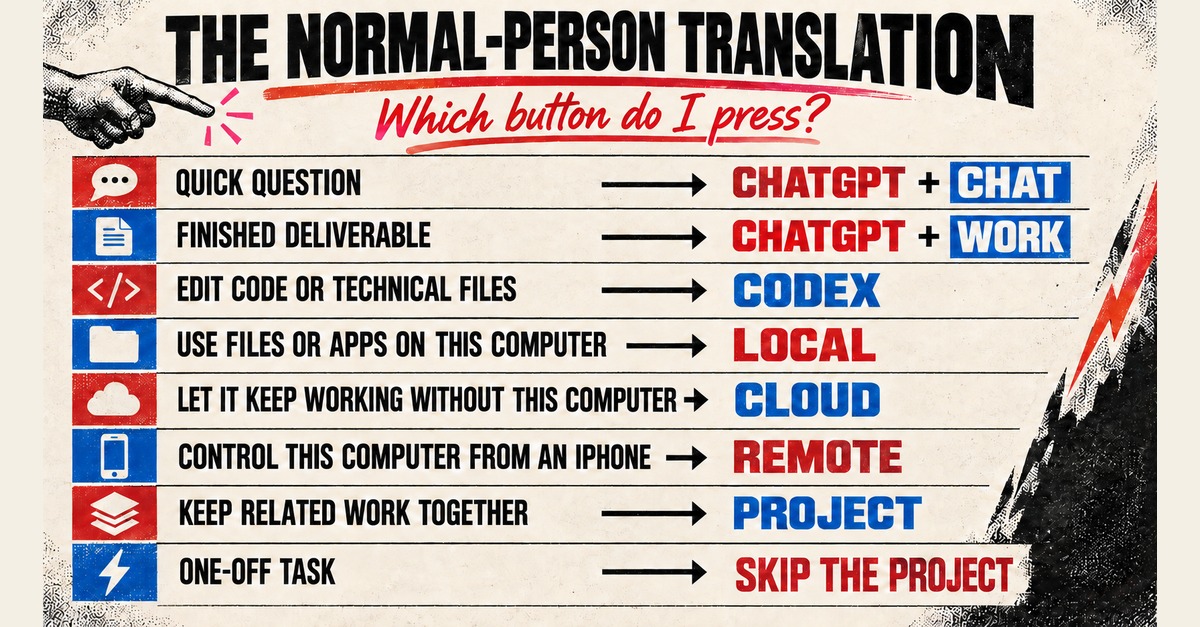
That is it. That is the orientation manual.
The larger problem is that these choices describe how OpenAI organized the product, not how ordinary people think about their work.
I don’t wake up thinking, “Today I need a cloud-based agentic deliverable inside a persistent context container.”
I think, “I need to compare insurance plans.”
The interface should ask what I’m trying to do:
- Ask something
- Make something
- Work on my files or code
- Continue an ongoing project
- Check on something from my phone
Then the artificial intelligence could use some of its intelligence to route the request appropriately.
Instead, I’m standing at the entrance to the future being asked to select my preferred taxonomy.
Gen X already survived blinking VCR clocks, DOS prompts, telephone trees, AOL installation CDs, and printers that could smell fear. We can learn another confusing interface if we have to.
But that’s not the point.
The point is that we shouldn’t have to. If I need AI to explain which AI button to press before I can use the AI, somebody has added at least one button too many.